

A study app is only useful if it solves a real problem.
One student may need a better way to memorize vocabulary. Another may struggle with distractions, while someone else may have hundreds of pages of course material to organize. Using the same app for every situation does not necessarily make studying easier.
A better approach is to choose a small set of tools based on the way you actually study.
Current study-app comparisons commonly separate tools by their purpose: Anki and Quizlet for flashcards, Notion for organization, Forest for focus, Goodnotes for handwritten notes, and newer AI tools such as NotebookLM for working with source material. Soft Arabia
Here are some useful study apps to consider in 2026 and the specific problems they can help solve.
Anki — Best for Spaced-Repetition Flashcards
Anki is designed around spaced repetition, a method in which review sessions are distributed over time rather than concentrated into one long study session.
Instead of repeatedly reading the same notes, you actively try to recall the answer on a flashcard. The system then schedules future reviews based on your performance.
That makes Anki particularly useful for material that requires long-term memorization, such as:
- Vocabulary
- Medical terminology
- Definitions
- Formulas
- Historical facts
- Names and dates
- Other factual material
The interface is not as visually polished as some newer study apps, and creating a well-organized deck can take time. But for students who need systematic flashcard review, that extra setup can be worthwhile.
Best for: Long-term memorization and spaced-repetition study.
Quizlet — Best for Easy Flashcard Study
Quizlet is a more approachable option if you want to create or use flashcards without spending much time learning the software.
It can be useful for vocabulary, definitions, terminology and quick review before an exam. Its large collection of study sets can also make it easier to get started when you do not want to build every card from scratch.
The trade-off is that available features and access can depend on the current plan.
Quizlet is particularly useful when your priority is getting into a study session quickly rather than building a highly customized spaced-repetition system.
Best for: Quick flashcards, vocabulary and straightforward exam review.
Notion — Best for Organizing Coursework
Notion works more like a digital workspace than a dedicated memorization app.
You can use it to organize:
- Lecture notes
- Assignment deadlines
- Reading lists
- Course schedules
- Project information
- Study plans
- Research material
Its flexibility is also its biggest limitation. It is easy to spend too much time designing dashboards, color-coding pages and downloading templates instead of doing the actual coursework.
Keep the setup simple. A basic course page with notes, deadlines and a task list is often enough.
Best for: Notes, planning and keeping coursework organized.
Forest — Best for Focus Sessions
Forest takes a simple approach to concentration. You start a focus session and grow a virtual tree while you stay focused. Leaving the session can interrupt the process.
The idea is not complicated, but that can be useful. Instead of opening another complicated productivity system, you simply decide how long you want to study and start the timer.
A focus timer will not solve every procrastination problem, but it can provide a useful boundary around a short study session.
Best for: Students who mainly struggle with phone distractions.
NotebookLM — Best for Studying Your Own Sources
NotebookLM is particularly interesting for courses that involve a lot of reading.
Instead of asking an AI tool about a subject in general, you can provide your own source material and use the system to work with those documents.
That can be useful for:
- Lecture notes
- Research papers
- Course PDFs
- Study guides
- Text documents
- Other class materials
It can help summarize information, answer questions about provided sources and identify connections between documents.
However, AI-generated summaries should still be checked against the original material. A study assistant can make a mistake, misunderstand context or leave out an important qualification.
Best for: Research-heavy courses and students working with lots of documents.
Otter.ai — Best for Lecture Transcription
Otter.ai can convert spoken audio into searchable text, making it potentially useful for lectures, meetings and study discussions where recording is permitted.
A transcript can make it easier to find a particular explanation later instead of searching through pages of handwritten notes.
There is one important consideration: always follow your school’s or instructor’s recording rules and obtain permission where required.
Also, transcription is not a replacement for paying attention during class. It is better viewed as an additional reference that can help you review material later.
Best for: Students who need searchable lecture transcripts.
Grammarly — Best for Improving Written Work
Grammarly is useful when the problem is not understanding the subject but communicating your ideas clearly.
It can help identify issues involving grammar, spelling, clarity and wording.
This can be particularly useful when preparing:
- Essays
- Reports
- Applications
- Emails
- Research assignments
- Presentations
AI writing assistance should still be treated as an editing aid rather than a substitute for your own work. Check suggested changes and make sure the final writing accurately represents your ideas.
Best for: Proofreading and improving academic writing.
Todoist — Best for Managing Assignments
A large assignment becomes easier to manage when it is divided into smaller tasks.
Todoist can be used to turn something like:
“Finish research paper”
into separate steps:
- Choose topic
- Find sources
- Read sources
- Create outline
- Write introduction
- Draft main sections
- Edit
- Submit
This is a simple idea, but breaking large projects into smaller actions can make deadlines easier to manage.
You can also use recurring tasks for regular study sessions or weekly assignments.
Best for: Assignment planning and deadline management.
Goodnotes — Best for Handwritten Digital Notes
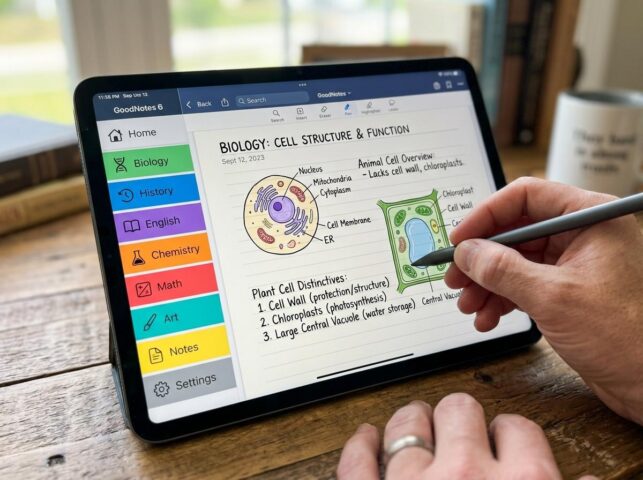
Goodnotes is designed for digital handwriting and is particularly relevant to students using an iPad and stylus.
You can write notes, annotate PDFs, organize digital notebooks and search handwritten material where supported.
The original claim that handwriting is always better than typing needs some caution. Research has reported potential learning advantages from handwritten note-taking, but later replication work and reviews have found mixed results, so it is better not to treat handwriting as universally superior. AIS eLibrary
In practice, the best note-taking method depends on the student, subject and task. Goodnotes is most useful when you genuinely prefer handwriting and want the organizational advantages of digital notes.
Best for: iPad users who prefer handwritten notes and PDF annotation.
Best Study Apps by Purpose
| App | Best For | Main Strength | Main Limitation |
|---|---|---|---|
| Anki | Memorization | Spaced-repetition flashcards | More setup required |
| Quizlet | Quick review | Easy flashcards and study sets | Some features are plan-dependent |
| Notion | Organization | Flexible notes and planning | Can become overly complicated |
| Forest | Focus | Simple focus sessions | Limited to the focus problem |
| NotebookLM | Source-based study | Works with your own documents | AI output still needs checking |
| Otter.ai | Lectures | Searchable transcription | Recording rules and accuracy matter |
| Grammarly | Writing | Grammar and clarity assistance | Not a substitute for writing skills |
| Todoist | Planning | Breaks projects into tasks | Does not teach the material |
| Goodnotes | Handwritten notes | Digital handwriting and annotation | Best suited to compatible devices |
How to Choose Your Study App Lineup

You do not need every app on this list.
Start by identifying the part of studying that causes you the most trouble.
If You Struggle With Memorization
Choose a flashcard system such as Anki or Quizlet.
Use it for active recall instead of simply rereading your notes.
If You Lose Track of Assignments
A planning tool such as Todoist can help you divide large assignments into smaller steps and keep deadlines visible.
If Your Notes Are Disorganized
Notion or Goodnotes may be more useful, depending on whether you prefer typed or handwritten notes.
If Your Phone Keeps Distracting You
A simple focus timer such as Forest may be more useful than another note-taking or AI app.
If You Have Too Much Reading
NotebookLM can help you work through your own documents, while a conventional note-taking system can keep your findings organized.
If Academic Writing Is the Problem
Grammarly can provide an additional proofreading pass, but make sure the final assignment remains your own work and follows your institution’s academic-integrity rules.
You Don’t Need Ten Study Apps
A useful study setup can be surprisingly small.
For example, a student might use:
Anki + Notion + Forest
for memorization, organization and focused study sessions.
Another student might need:
NotebookLM + Goodnotes + Todoist
for reading-heavy coursework, handwritten notes and assignment management.
The important thing is not the number of apps. It is whether each tool solves a specific problem without creating extra work.
If you find yourself spending more time customizing a study system than actually studying, simplify it.
Build Your Study System Around the Learning Task
The app should support the study method, not become the study method.
For memorization, active recall and spaced review are more important than having an attractive dashboard.
For assignments, a clear deadline and manageable task list matter more than an elaborate productivity setup.
For research, being able to locate and understand your source material matters more than collecting dozens of AI-generated summaries.
And for focus, sometimes a simple timer is enough.
Choose the smallest setup that helps you do the actual work.
Final Thoughts
The best study apps in 2026 are not necessarily the ones with the longest feature lists. They are the tools that solve a specific learning problem without making your study routine more complicated.
Use Anki or Quizlet when you need structured recall practice. Use Notion or Goodnotes when organization and notes are the problem. Try Forest when distractions are getting in the way, and consider NotebookLM when you are working through a large collection of your own study materials.
You do not need to download everything.
Start with the one problem that is slowing your studying down, choose a tool that addresses it, and give yourself enough time to see whether it actually improves your routine.
Related reading: Pair the right app with effective methods from our guide to study techniques to improve your grades, and see our overview of educational apps for adults.



[…] Best Study Apps in 2026: The Tools That Actually Help You Learn Education […]