
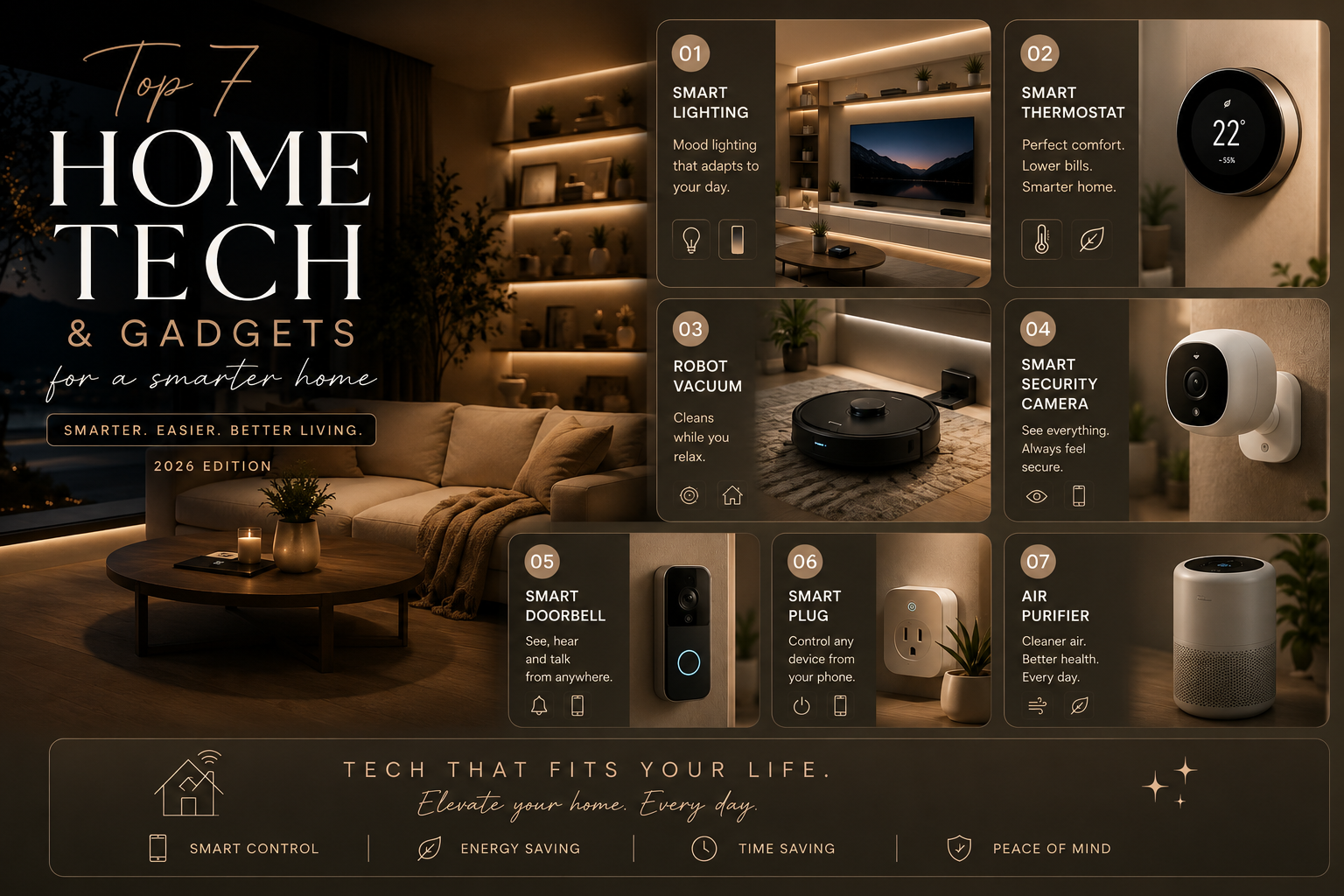
The most useful smart home tech gadgets that make life easier are the ones that solve a daily annoyance rather than add another app to manage. A robot vacuum can help with routine floor cleaning, smart lights can simplify evening routines, and a video doorbell can make it easier to see who is at the door. The right setup depends on your home, budget, internet connection, and the devices you already use.
You do not need to automate every room at once. Start with one device that addresses a real need, check compatibility before buying, and add more only when the first device is working reliably.
1. A Robot Vacuum for Routine Floor Cleaning
A robot vacuum can pick up everyday dust, crumbs, and pet hair between deeper cleans. Many models offer scheduled cleaning, app control, and room mapping, while some higher-end versions also mop or empty their own dustbins.
What to check before buying
- Measure door thresholds and consider whether rugs, cables, or clutter will obstruct the route.
- Check whether the model suits your floor types and the amount of pet hair in your home.
- Compare replacement filters, brushes, bags, and any optional subscription costs.
It works best when floors are reasonably clear and the device can reach the areas you want cleaned. It reduces routine work but does not replace occasional deep cleaning.
2. Smart Lighting for Easier Daily Routines
Smart bulbs and switches can let you control lights with an app, voice assistant, or schedule. You might set hallway lights to turn on at a certain time, dim living-room lights in the evening, or switch off several lights together when leaving home.
Smart bulbs are often the simplest starting point because they usually do not require changes to household wiring. Check the bulb fitting, brightness, color temperature, and compatibility with your preferred smart-home platform. If someone uses a wall switch to cut power to a smart bulb, app and voice control may stop working until power is restored.
3. A Video Doorbell for Front-Door Awareness
A video doorbell can show who is at the door and may offer motion alerts, two-way audio, and recorded clips. These features can be helpful for deliveries or when you cannot answer immediately, but capabilities differ by model and may depend on a paid storage plan.
Before choosing one, check Wi-Fi coverage at the entrance, power or battery requirements, storage fees, and whether installation suits your property. Position the camera to respect neighbors’ privacy and follow local rules about recording shared spaces.
4. A Smart Thermostat for Temperature Scheduling
In homes with compatible heating or cooling systems, a smart thermostat can schedule temperatures and allow adjustments from a phone. Some models offer occupancy-based routines or energy reports, which may help you avoid heating or cooling an empty home unnecessarily.
Compatibility is essential: not every thermostat works with every HVAC system, and installation may require specific wiring or professional help. Check your system’s model and the manufacturer’s compatibility guide before purchasing. Savings are not automatic; results depend on the climate, home insulation, energy prices, and how the schedule is used.
5. A Smart Lock for Flexible Access
A smart lock may let you lock or unlock a door through a keypad, app, or temporary access code. This can be convenient for families, guests, or trusted service providers, and some models send notifications when the lock is used.
Check that the lock fits your door and existing hardware, and understand what happens if its battery runs low or the internet connection fails. Keep a reliable backup entry method and use unique access codes that can be removed when they are no longer needed. A smart lock adds convenience, but it should be selected and installed with physical security in mind.
6. A Smart Speaker or Display
A smart speaker can provide voice control for compatible lights, plugs, timers, reminders, and other devices. A smart display adds a screen for video calls, recipes, or a dashboard for supported devices. For many households, this becomes the simplest way to control a small collection of connected products.
Compare privacy controls, microphone mute options, sound quality, and the smart-home platforms supported. If you already use a particular phone or assistant ecosystem, choosing compatible devices can reduce setup friction.
7. Smart Plugs and Retrofit Controls
A smart plug can schedule or remotely switch certain plug-in appliances, such as a lamp or fan, provided the device is suitable for that use and within the plug’s electrical rating. Retrofit controls can also add limited smart functionality without replacing an entire switch or fixture.
Do not use a smart plug with appliances that draw more power than its rating or with equipment that must not be switched off unexpectedly. Check manufacturer guidance, electrical ratings, and local safety requirements. For hardwired changes, use a qualified electrician where appropriate.
Smart Home Gadgets Compared
| Gadget | Best for | Setup considerations |
|---|---|---|
| Robot vacuum | Routine floor cleaning | Floor type, thresholds, replacement parts |
| Smart lighting | Schedules and convenient control | Bulb fitting, hub or Wi-Fi needs |
| Video doorbell | Visitor and delivery alerts | Wi-Fi, power, storage, privacy |
| Smart thermostat | Heating and cooling schedules | HVAC compatibility and wiring |
| Smart lock | Access codes and remote control | Door fit, backup entry, battery |
| Smart speaker/display | Voice control and routines | Platform compatibility and privacy |
| Smart plug | Scheduling compatible plug-in devices | Electrical rating and appliance suitability |
How to Choose Your First Smart Home Device
Start with the problem
Choose the task that regularly frustrates you. If cleaning is the issue, consider a robot vacuum. If you often leave lights on, smart lighting may be a better first purchase. One well-chosen device is more useful than several that never become part of your routine.
Check compatibility and total cost
Look beyond the upfront price. Include replacement parts, batteries, cloud storage, optional subscriptions, hubs, and installation where relevant. Confirm that the device works with your existing phone, router, and smart-home platform.
Review privacy and security settings
Use a strong, unique account password, enable multi-factor authentication when available, install firmware updates, and review what data the device collects. Avoid sharing access more widely than necessary, especially for cameras and locks.
Plan for Wi-Fi and Internet Outages
Some smart-home devices rely on cloud services, while others can continue certain functions locally. Before buying, check what happens if your internet connection drops or the manufacturer’s service becomes unavailable. A smart lock should have a reliable approved way to enter the home if the app or network fails, and lighting controls should still suit the household’s needs during an outage.
If your Wi-Fi signal is weak in the room where a device will sit, test the connection before assuming the gadget itself is faulty. Some products require a specific Wi-Fi band, a compatible hub, or a supported phone operating system. Read the setup requirements and return policy carefully, particularly if you live in a large home or have an older router.
Secure Cameras, Locks, and Shared Access
Devices connected to doors or cameras deserve extra attention because they can reveal information about household routines. Change default passwords, enable multi-factor authentication where available, install firmware updates, and review the accounts that can view footage or unlock doors. Remove access promptly when a guest, contractor, or former household member no longer needs it.
Check whether video storage requires a subscription and how long recordings are kept. Place cameras thoughtfully and respect other people’s privacy, especially in shared spaces and areas where people expect privacy. Do not assume that a camera or lock is secure simply because it is marketed as a smart device.
Consider Maintenance and Long-Term Support
Smart devices can need replacement filters, brushes, batteries, light bulbs, or firmware updates. Check the availability and cost of consumable parts before buying, and look for a clear support policy. A low upfront price may not be the least expensive option if essential features require a recurring subscription or the manufacturer stops supporting the product soon after purchase.
For renters, choose devices that can be removed without damaging walls, wiring, or door hardware, and get permission before making permanent changes. Homeowners should still check installation requirements and use a qualified professional for electrical work or modifications that are outside the manufacturer’s simple setup instructions.
A Sensible Order for Building a Smart Home
- Choose one everyday problem to solve.
- Check compatibility, connectivity, installation, and total cost.
- Set up the device and learn its privacy and security controls.
- Use it for a few weeks before adding another device.
- Keep it only if it makes the routine easier and remains reliable.
If you are refreshing a room alongside your smart-home setup, our guide to simple home decor ideas offers low-cost ways to improve the space without buying a whole new set of furniture.
Final Thoughts
The best smart home gadgets make everyday tasks simpler without creating more maintenance. Robot vacuums, smart lighting, video doorbells, thermostats, locks, speakers, and smart plugs each solve different problems. Start with the one that fits your home and habits, check compatibility carefully, and build your setup gradually rather than buying everything at once.

[…] 7 Smart Home Gadgets That Make Life Easier in 2026 […]