

Best AI Tools for Everyday Work in 2026
If your inbox is a mess, your to-do list never shrinks and you’ve got four browser tabs open just to draft one email — you’re exactly who this guide is for. The best AI tools for everyday work in 2026 aren’t just chatbots anymore; they’re the quiet assistants doing the boring parts of your job so you don’t have to.
I’ve spent the last few months actually using these tools, not just reading about them and a few surprised me. Some over-hyped names didn’t make the cut. A couple of smaller tools earned a permanent spot in my daily routine. Here’s the honest rundown.
Why AI Tools Actually Matter for Work Now (Not Just Hype)
A couple of years ago, “AI tool” mostly meant one thing: a chatbot you asked questions. That’s changed. Now these platforms read your documents, sit inside your email, summarize meetings while you’re still talking and generate first drafts of nearly anything.
The real shift isn’t that AI got smarter — though it did. It’s that AI got embedded. It’s less “open a new app” and more “it’s already there when I need it.” That’s the difference between a novelty and an actual productivity gain.
The All-Rounders: ChatGPT, Claude and Gemini
Start here if you’re building a stack from scratch. These three cover the widest range of everyday tasks — writing, research, coding help, summarizing and general problem-solving.
ChatGPT remains the easiest on-ramp for most people. It’s quick, conversational and handles quick questions, image generation, and voice mode without much of a learning curve. If you’re new to AI tools entirely, this is where I’d point a beginner.
Claude tends to shine on longer, more nuanced work — drafting a detailed proposal, working through a messy piece of code, or reasoning through a problem that has a lot of moving parts. It’s the one I reach for when a task actually requires thinking, not just generating text.
Gemini is quietly everywhere already. If you use Gmail, Docs, Sheets or Meet, you’ve probably brushed up against it without realizing. It’s convenient because it’s built in, though it doesn’t always match the other two for deeper, more demanding work.
None of these is objectively “the best.” They’re just different tools for different moods of work.
Research and Fact-Checking: Perplexity and NotebookLM
Not every task needs a creative writer — sometimes you just need a straight, sourced answer.
Perplexity is built for exactly that. Ask it something factual, and it hands back an answer with sources attached, so you’re not stuck double-checking a chatbot’s homework. It’s become my default for quick research where accuracy actually matters.
NotebookLM works differently — you feed it your own documents, PDFs, or links, and it only answers based on what you gave it. That makes it genuinely useful for studying a contract, prepping for a meeting, or digging through a stack of reports without the AI wandering off and making things up.
Writing and Content Creation Tools
Writing is still the category where AI tools show up most in everyday work — emails, reports, product descriptions, social captions, you name it.
Beyond the general chatbots, purpose-built writing tools tend to give you more consistent tone and structure for business content, especially if you’re producing a high volume of it. They’re worth considering if writing eats a big chunk of your week.
Quick tips for using AI writing tools well:
- Give it your actual voice — paste in a past email or post as a style reference
- Edit the output; don’t publish the first draft as-is
- Use it for structure and speed, not for final polish
Meeting Notes and Voice-to-Text Tools
This category snuck up on a lot of people. Tools that sit in your meetings, transcribe them, and hand you clean, action-ready notes afterward have quietly become one of the biggest time-savers in modern work.
Similarly, dictation tools that turn spoken thoughts into usable text are handy for anyone who thinks faster than they type — which, honestly, is most of us. Instead of staring at a blank doc, you talk it out and clean it up after.
Design and Visual Content Tools
You don’t need design training anymore to make something that looks decent. AI-powered design tools now handle a lot of the heavy lifting — resizing, layout suggestions, even generating full graphics from a text prompt.
Image generators have also matured a lot. They’re genuinely useful for quick mockups, social media visuals, or concept art, especially when you need something now and don’t have a designer on call.
Automation and Workflow Tools
This is the category that turns individual AI tools into an actual system. Automation platforms connect your apps together so tasks move from one to the next without you touching them manually — a form submission triggers an email, a new file triggers a summary, that sort of thing.
They take a bit more setup than a chatbot, but once they’re running, they quietly save hours every week without you thinking about it.
Comparison Table: Best AI Tools by Task
| Task | Top Pick | Best For | Typical Cost |
|---|---|---|---|
| General assistant | ChatGPT | Beginners, all-around use | Free / ~$20 per month |
| Deep writing & reasoning | Claude | Long-form content, complex tasks | Free / ~$20 per month |
| Google Workspace integration | Gemini | Docs, Sheets, Gmail users | Free / included with Workspace |
| Sourced research | Perplexity | Fact-checking, current info | Free / ~$20 per month |
| Document Q&A | NotebookLM | Studying, meeting prep | Free |
| Meeting notes | Voice-note apps (e.g., Granola-style tools) | Automatic transcription & summaries | ~$20 per month |
| Design & visuals | Canva Magic Studio | Quick graphics, no design skill | Free / paid tiers |
| Workflow automation | Zapier-style platforms | Connecting apps, repetitive tasks | Free / usage-based |
How to Choose the Right AI Tools for Your Work
Don’t try to adopt everything at once — that’s how good tools end up abandoned in a browser bookmark folder.
Start with your biggest time drain. If it’s writing, get a writing assistant. If it’s meetings, get a note-taker. Fix the loudest problem first.
Stick to free tiers while testing. Most of these tools let you try before you commit to a subscription. Use that. A tool that sounds great on paper might not fit how you actually work.
Think about where you already spend your day. A tool built into Gmail or Docs will get used more than a separate app you have to remember to open. Convenience beats capability more often than people expect.
Final Thoughts
The best AI tools for everyday work in 2026 aren’t the ones with the flashiest demo — they’re the ones that quietly disappear into your routine and just make things faster. Pick one or two that solve your actual bottleneck, use the free plans first, and build from there. You don’t need a ten-tool stack to see the benefit.
FAQ
What are the best AI tools for everyday work in 2026? ChatGPT, Claude, and Gemini remain the strongest all-around picks, with Perplexity for research and NotebookLM for working with your own documents rounding out a solid everyday stack.
Are AI productivity tools free to use? Many are — most major tools offer a usable free tier, with paid plans (often around $20 per month) unlocking higher limits and more advanced features.
Which AI tool is best for writing emails and reports? Claude and ChatGPT both handle business writing well, though purpose-built writing tools can help if you need a consistent brand tone across a high volume of content.
Can AI tools replace a human assistant? Not entirely — they’re strongest at drafting, summarizing, and repetitive tasks, but decisions, judgment calls, and relationship-based work still need a person.
Do I need multiple AI tools, or just one? One general-purpose tool like ChatGPT or Claude covers most everyday needs; add a specialized tool only once you hit a specific, recurring bottleneck.
Use AI Tools Responsibly at Work
Before adopting a tool, check what data it stores, whether inputs may be used to improve models, what controls are available, and whether your employer permits its use. Avoid entering passwords, confidential client information, private employee records or unpublished business data unless your organisation has approved the tool and settings.
Review Outputs Before Sharing Them
AI-generated answers can sound confident while containing errors, missing context or outdated details. Verify important claims with primary sources, check calculations and citations, and review the tone and audience fit yourself. For recurring tasks, test a tool on a small, low-risk example before building it into a workflow.


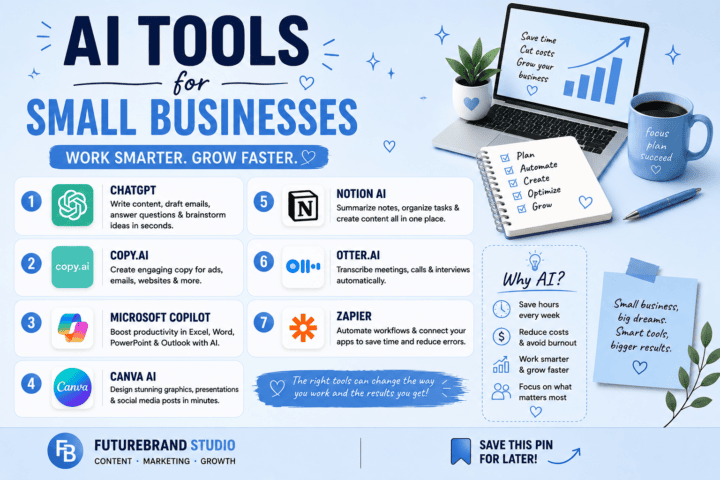
[…] you are mainly looking for writing support, compare this guide with our overview of AI tools for everyday work and free AI writing tools. Treat software features and pricing as changeable details and confirm […]
[…] Do not judge a tool by the word “free” alone. A plan may provide limited trial access, require paid credits after the first tests, or restrict particular models. Save the date when you checked the plan and revisit the official pricing page before starting a time-sensitive project. For broader AI productivity options, see our guide to AI tools for everyday work. […]